
TL;DR
- A firmware AI can’t run the binary (it cross-compiles), has no runtime introspection, and can’t see hardware state — so unlike a web AI that checks its own output, it is “blind.”
- Setup, then, is the work of filling in by hand what the AI can’t see, and every piece of context falls into one of three buckets: invisible (give it), buried (point to it, not the value), already-visible (don’t copy it).
- Copy a value that already lives in code into CLAUDE.md and the two truths drift apart — the AI trusts the wrong one — so block only the unbreakable rules with
grep+exit 2hooks and just point at everything else.
A web-frontend AI agent sees its own output. It edits a component, spins up a dev server, opens a browser, reads the console errors, queries the DOM, checks the network tab, and fixes itself. The observe → fix → re-observe loop closes inside the agent. You only have to say “the button doesn’t click.”
Expect the same in firmware and it collapses. The first thing I had to accept while running nRF/Zephyr firmware through Claude Code is that this AI is blind. Three reasons.
- It cross-compiles, so it can’t run on the host. The build artifact is an ARM Cortex-M binary. It cannot execute on the x86 Linux/Windows box the agent runs on. The “just run it and read the error” first feedback that a web AI relies on simply does not exist.
- There is no runtime introspection. The board is across the desk, behind a J-Link. By default the agent has no channel to print a variable, walk the stack, or inspect the heap.
- Hardware state never reaches a screen. Whether this pin is HIGH, whether the I2C line has a pull-up, how many mA are flowing — none of it is written anywhere in the code, and none of it prints to a console. It lives only on an oscilloscope and in a person’s eyes.
So what “AI-readiness setup” means for a firmware repo changes. It is not about writing a clever system prompt. It is the work of filling in, by hand, what the AI cannot observe for itself. The way you give a blind person a cane, braille, and audio cues, you fit a blind AI with prosthetics.
The catch is that “just write everything down, then” is wrong too. Write too much and it fails the other way. So I sort every piece of context first by how it looks from the AI’s point of view. This essay is about that sorting framework.
This piece is a follow-up to my earlier Developing Embedded Firmware with Claude Code — Devicetree, Kconfig, Debugging. How to teach Devicetree to the AI, how to build a skill that stops Kconfig hallucination, the “Hooks: Advisory vs. Deterministic” idea, and the “keep CLAUDE.md to minimal context” principle — I covered those in depth there. I won’t repeat the detail here; I’ll link to it. What’s new in this one is the single “blind AI” lens that ties all those prescriptions together, and what falls out of it: Mode C (don’t copy) and over-injection as a failure mode.
The sorting rule: how does this information look to the AI
When I weigh what to put in CLAUDE.md and what to leave out, I use one criterion. How does this information look from the AI’s point of view? The answer lands in one of three places.
- Mode A — Invisible: it lives outside the repo, so the AI can never see it. Prescription: give it.
- Mode B — Buried: it’s in the repo, but scattered across thousands of files, so the AI pays an expensive search to find it. Prescription: point to it (the location, not the value).
- Mode C — Visible: it’s already sitting cleanly in code or Devicetree. Prescription: don’t copy it.
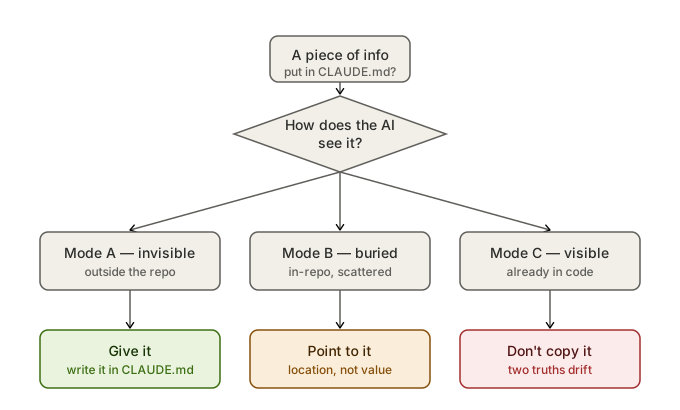
What goes in CLAUDE.md comes down to one question: how does it look to the AI?
Most setup guides only talk about Modes A and B — “give the AI enough context.” But the second way setup breaks in practice is the opposite: it breaks because you gave too much. Mode C is that boundary. Later I’ll cover why copying something already visible is harmful, and how it actively steers the AI toward wrong information.
Every example from here on is lifted straight from the CLAUDE.md and .claude/hooks/ of the nRF/Zephyr onboarding-template repo I actually use. None of it is invented.
Mode A — Invisible: give it
Some things the AI can never know, even with the whole repo in context: how to build, and what traps hide in the host environment. None of it is in the source. It lives in someone’s head and shell history.
The “Build & Flash” section of my CLAUDE.md opens with exactly this. The build must call west build with the python that ships inside the NCS toolchain, not the system python; the two environment variables ZEPHYR_BASE and ZEPHYR_SDK_INSTALL_DIR must be set. Name the build directory; add --pristine after touching prj.conf or an overlay; add --no-sysbuild to drop MCUboot — facts like these.
Leave it out and what does the AI do? It reaches for the “standard” Zephyr command it knows (west build -b <board>). Why that doesn’t run in this environment, the AI can never deduce — it can’t see what’s installed on the host.
The strongest case is “Known issues” in the same section. This is pure hard-won knowledge that appears in no datasheet and no official doc. My repo spells it out:
- Running
python -m westwith the system python does not work — you must use the NCS toolchain python. - sysbuild can break with a
_ctypes DLL import error→ install west, pykwalify, and pyelftools into the NCS toolchain python to fix it. - When Anaconda’s python sneaks into PATH, the
imgtool.py signstep throws an Access Violation (0xC0000005). Fix it by force-reinstalling cryptography and imgtool inside Anaconda, or by removing Anaconda from the system PATH.
The odds of an AI guessing 0xC0000005 are zero. This is a trap someone burned half a day to find, and pinning that half-day into three lines of CLAUDE.md keeps the AI — and the next person who joins — out of the same pit. This is where Mode A’s value shows most sharply.
Rules that no single file holds, but the whole system does
Mode A has a subtle sub-species: rules that are in the repo, but that no single file reveals. They are cross-cutting constraints, so however well the AI reads file after file, it can’t assemble them. Effectively, they’re invisible too.
The “Critical Constraints” section of my CLAUDE.md names this in its very first line — “These are cross-cutting nRF/Zephyr rules that aren’t obvious from reading individual source files.” The file header says the same thing in Korean: “rules you can’t see by reading the code alone.” That one line is, in fact, the spine of this whole essay.
The rules collected there look like this:
- Pristine build required. Change
prj.conf, an overlay,Kconfig,CMakeLists.txt, orsysbuild*.confand an incremental build won’t pick it up. Only.c/.hchanges get picked up incrementally. - No raw NVS API. Use the raw NVS API on the
settings_storagepartition and you corrupt BLE bonding data. Use the Zephyr Settings subsystem only. Change a key name or type and NVS breaks across a DFU. CONFIG_LOG_MODE_IMMEDIATEis dangerous. It can deadlock a USB/BLE ISR. Turn it on briefly for debugging, then take it back out.- ISR discipline. An ISR only gives a semaphore; heavy driver work runs in thread context.
- No bare polling.
while(!ready)must have a timeout +k_msleep()+ an-ETIMEDOUTreturn.
None of these can be learned by reading main.c. “Why you can’t use raw NVS” is a conclusion that only emerges when the settings_storage partition layout, how BLE bonding is stored, and DFU migration all sit in one place. A human writing that conclusion down once — that’s Mode A.
Mode B — Buried: point to the location, not the value
Some information is clearly in the repo, but the AI has to pay an expensive search to find it: the pinmap, a protocol frame format, the merged Devicetree. The common mistake here is copying that value into CLAUDE.md. That falls into the Mode C trap (next section). The right prescription is to point at the location and the access path.
My repo’s “Devicetree as source of truth” rule works this way. Don’t hardcode pins/ports/addresses — reach them through Devicetree macros like DT_NODELABEL(), GPIO_DT_SPEC_GET(), SPI_DT_SPEC_GET(). And, crucially, after editing an overlay it tells you only the way: check the actually-merged pins in build/<proj>/zephyr/zephyr.dts. It doesn’t write the value; it writes where the value is produced.
Big chunks get split into their own file with only a pointer left behind. Protocol definitions and pinmaps go into *_PROTOCOL.md-style files at the repo root, and CLAUDE.md keeps a single line saying “it’s here.” The AI opens that file only when it’s doing that work. It never rides in the always-on context.
The deeper method of teaching Devicetree to the AI — which files to hand it, in what order — I covered in that earlier piece, so I won’t repeat it. Mode B’s point fits in one line: don’t copy scattered information; write down where and how to get it.
Mode C — Visible: don’t copy it
This is the mode most setup guides miss. Register values, peripheral definitions, pin numbers — these already sit cleanly in code and Devicetree. The AI sees them exactly with a single grep. Mode C information is already visible.
In the earlier piece I noted briefly that you should “reference the .svd file instead of putting the register map in CLAUDE.md.” That was framed as “keep CLAUDE.md short.” Here I go one step further, into why copying isn’t merely wasteful but actively dangerous.
And yet people “helpfully” write it into CLAUDE.md anyway. “SPI0 is P0.04/P0.05, clock 8MHz,” that kind of thing. Don’t. Two reasons.
ⓐ It eats CLAUDE.md’s context budget. CLAUDE.md is an always-on cost — it loads in full on every call. Fill it with values you could learn by reading the code and you crowd out the room that Mode A’s invisible rules need. The reasons to keep CLAUDE.md at minimal context, I covered in the earlier piece.
ⓑ It’s already sitting cleanly in code, so there’s no reason to write it. Duplicating information the AI can find precisely is meaningless at best and usually harmful.
Why harmful? Here’s the real failure mode. Two sources of truth will always drift apart. Someone moves the SPI pin from P0.04 to P0.06 in Devicetree. The code uses GPIO_DT_SPEC_GET(), so it follows automatically. But “P0.04” pinned in CLAUDE.md — nobody fixes that. Now the repo holds two contradictory values. The AI sees both. And it tends to trust the wrong one — the one written out plainly in natural language in CLAUDE.md. One helpfully-written line has pulled the AI off the correct code and onto a stale note.
So my repo keeps “never hardcode pins/ports/addresses” as a rule. The value lives in Devicetree, the code points at it through the DT API, and CLAUDE.md does not copy it. Mode C’s prescription isn’t an action — it’s restraint. Leave what’s already visible where it’s visible.
The three modes in one line: Mode A fills in what’s missing, Mode B points at what’s scattered, Mode C doesn’t touch what’s already there. That covers static context. But a firmware AI isn’t blind only in the static sense. After it writes code, it can’t see how that code behaves on the board either. So two dynamic axes are needed on top.
Axis ① — lending the AI your eyes
If the three modes are about organizing “the static context the AI reads,” this axis is dynamic. You feed back, in real time, the build results and runtime behavior the AI can’t see — you lend it your eyes for a moment.
The mechanism is simple. Build errors, boot logs, RTT output — you copy this output the AI can’t see directly and paste it into the conversation. Only then does the AI “see.” An important detail: logs are factual data, so there’s little room for hallucination. Accuracy is noticeably higher when the AI fixes against a real error message than when it guesses at code. I covered this separately in my workflow piece. The more structured the log (e.g. a consistent format from an RTT backend), the better this feedback gets.
I also keep aids that make the copy-paste cheaper. My repo has a /check-kconfig <keyword> command. A built .config is thousands of lines; drop the whole thing into context and tokens explode. The command filters by keyword and shows only the relevant symbols. When the AI needs to check “is this Kconfig symbol on?”, it gets the answer in a few dozen tokens instead of reading the whole file. Build errors get logged into impl-log.md, so on the next turn the AI reads that file and retraces its own mistake.
The essence of this axis is to build a channel where a person temporarily stands in for the AI’s blinded eyes. The smoother the channel (cheaper tokens, more structured logs), the faster the loop turns.
Axis ② — let a machine verify what the AI can’t see
Copy-paste feedback has a hole: it depends on a human. Busy, you skip it; tired, you look the other way. So the rules you must never break don’t get left to human attention — they get left to a check that runs automatically the moment you save. A deterministic hook.
Here’s what’s decisive. A hook’s check is not the AI’s judgment. It’s one line of grep. The same input always yields the same result. There’s no room for the AI to decide “this is probably fine.” A rule written in CLAUDE.md is advice — the AI reads it and mostly follows it, but it can ignore it. A hook is a contract — if the code trips the condition, the machine stops it.
In my repo’s .claude/hooks/, those two characters sit side by side as code. First the blocking kind, block-no-sysbuild.sh:
# Hook: PreToolUse/Bash — block `west build --no-sysbuild`
INPUT=$(cat)
CMD=$(echo "$INPUT" | grep -oE '"command"[[:space:]]*:[[:space:]]*"([^"\\]|\\.)*"' | head -1)
HAY="${CMD:-$INPUT}"

if echo "$HAY" | grep -qiE 'west[[:space:]]+build' \
   && echo "$HAY" | grep -qiE '(--no-sysbuild|--no_sysbuild)'; then
  echo "BLOCKED: 'west build --no-sysbuild' excludes USB DFU (MCUboot + mcumgr)." >&2
  exit 2
fi
exit 0
When the AI tries to run west build --no-sysbuild, this hook catches the command string with grep and blocks the tool call itself with exit 2. (--no-sysbuild drops MCUboot and produces a build that can’t be DFU-updated — it’s only a debugging workaround, not something the AI should reach for absent-mindedly.) The AI cannot run the command. No looking the other way.
The other kind only warns — warn-raw-nvs.sh:
# Hook: PostToolUse/Edit|Write — warn when raw NVS API is added to C source.
if echo "$FILE_PATH" | grep -qiE '\.(c|h)$' \
   && echo "$HAY" | grep -qE 'nvs_(write|read|delete|init|mount|get_free_space|calc_free_space)[[:space:]]*\('; then
  echo "WARNING: raw NVS API detected in $FILE_PATH." >&2
  echo "CLAUDE.md: NEVER use raw NVS API ... it corrupts BLE bonding." >&2
fi
exit 0
This one catches a new raw nvs_*() call in a .c/.h file with grep and raises a warning, but exit 0, so it does not block. Raw NVS isn’t always wrong — off the settings_storage partition it can be legitimate. So it’s a warning (exit 0), not a block (exit 2). Leave the judgment to the human, but never let the danger signal get buried.
The difference between these two scripts is exactly the line between “advice” and “contract.” Which rule you raise to exit 2 and which you leave at exit 0 is, in effect, your repo’s safety policy itself. Beyond these two, my repo has pristine-reminder.sh (remind a pristine build when build config changes), warn-log-immediate.sh (warn on LOG_MODE_IMMEDIATE), protect-keys.sh (block writes under keys/), and protect-destructive.sh (block --eraseall / force-push and friends) laid down on the same pattern.
Why you should split hooks into Advisory and Deterministic conceptually I laid out in the earlier piece. What I want to add here isn’t the concept but the artifact: the difference between one exit 2 line and one exit 0 line lives not in the abstract but inside a seven-line shell script.
Retrospective — the prosthetics list is an entry cost, but it compounds
Step back from everything written so far — the exact build commands, the host-environment traps, the emergent rules no single file holds, the pointers into Devicetree, the log feedback channel, the deterministic hooks — and it’s a list of prosthetics fitted, one at a time, to a blind AI. It makes the unseen build procedure visible, points at the unfindable rule, and lets a machine block the mistake you can’t catch.
This isn’t free. It’s a clear entry cost. To run one board, one repo, alongside an AI, you have to carve these prosthetics once. But carve them once and every job afterward pays you back. The three lines of 0xC0000005 trap pinned in CLAUDE.md save the same half-day across dozens of later builds. One exit 2 hook means a DFU-incapable build never gets made again. The entry cost is paid once; the return comes every time.
How ready your own repo is, you can check with the eight items below. The tag at the end of each points to which mode it belongs to.
Appendix — Firmware repo AI-readiness checklist
Copy this to audit your own repo’s CLAUDE.md/hooks setup. Each item is judged by one question: “can the AI see it for itself?”
[ ] 1. Are the exact build/flash commands in CLAUDE.md?              [Mode A]
       (toolchain python path, required env, --pristine/--no-sysbuild,
        artifact path. Don't leave it to guess the "standard west command".)

[ ] 2. Are host-environment traps (Known issues) written down?       [Mode A]
       (DLL errors, PATH conflicts, a specific error code -> workaround.
        Knowledge no datasheet has. Start with what the AI can never guess.)

[ ] 3. Are emergent rules no single file shows collected?            [Mode A]
       (NVS bonding corruption, ISR discipline, pristine required, and other
        cross-cutting constraints. System rules no one source file assembles.)

[ ] 4. Do you point at scattered big info by location, not value?    [Mode B]
       (Split pinmap/protocol into their own files, leave only a pointer.
        For merged output, tell the way: check the generated path (zephyr.dts).)

[ ] 5. Have you NOT copied code-resident values into CLAUDE.md?      [Mode C]
       (No duplicating register values/pin numbers. Two truths drift, and the
        AI trusts the wrong one written out in natural language.)

[ ] 6. Is there a path to feed build/runtime errors back to the AI?  [Axis 1]
       (Logs are factual data, so accuracy is high. The more structured the
        log (RTT), the better the loop turns. A load file like impl-log helps.)

[ ] 7. Is there a token-cheap lookup tool?                           [Axis 1]
       (Don't read the whole .config — filter by keyword. A narrow lookup
        command that keeps big artifacts out of context wholesale.)

[ ] 8. Are unbreakable rules enforced by a hook (exit 2)?            [Axis 2]
       (CLAUDE.md text is advice (down to an exit 0 warning). Block only the
        truly-unbreakable rules with grep+exit 2. Separate advice from contract.)
Fill in all eight and your repo has become a workshop where a blind AI can work without groping.
References
Related internal posts
- Developing Embedded Firmware with Claude Code — Devicetree, Kconfig, Debugging — teaching the three Devicetree layers to the AI, a skill to prevent Kconfig hallucination, Advisory vs Deterministic hooks, the minimal-context CLAUDE.md principle
- How I Build Firmware with AI — Research, Plan, Implement, Test loops — why logs, as factual data, are where the AI is most useful; designing human gates