In the fast-moving world of IoT hardware, devices usually become obsolete within two years. However, some designs stick around because they solve a fundamental physics problem in a clever way.
Today, we are revisiting the SwitchBot Hub 2. Even in 2026, as Matter has become the standard communication protocol for smart homes, this device remains a fascinating case study. On the surface, it looks like just another gateway. But underneath the plastic, it is a brilliant example of thermal decoupling—solving a heat problem not with software, but with a custom hardware solution that drives Bill of Materials (BOM) managers crazy but makes engineers smile.
The smart home industry is converging on Matter. We previously explored how this protocol is changing lighting control in our [Aqara Dimmer Switch H2 teardown].
But end devices are only half the story. Today, we look at the backbone of the system: the Gateway.
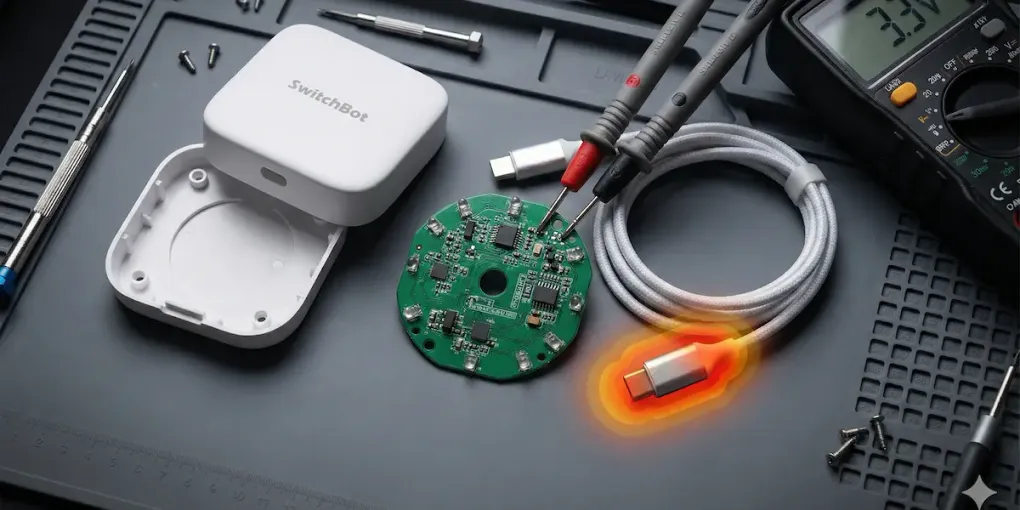
We tore it down to see how it ticks, how it handles the heat, and why that unusual USB cable is actually a stroke of genius.
The Sensor-in-Cable Design: Fighting Physics
The most distinct feature of the Hub 2 isn’t the display or the buttons. It’s the power cable. The temperature and humidity sensors are not located inside the main unit. Instead, they are embedded directly into the USB-C connector on the cable itself.
Why would a company complicate their supply chain with a custom-molded cable? The answer lies in Self-Heating.
The Thermodynamics of a Matter Gateway
To understand this design choice, you have to look at the workload. A Matter gateway like the Hub 2 is never truly “sleeping.” It has three major jobs that keep the silicon hot.
First, it maintains a constant Wi-Fi connection to cloud servers like AWS or Google Cloud. Second, it acts as a Thread Border Router to route packets between low-power devices and your IP network. Finally, it actively listens for BLE advertising packets from SwitchBot Curtains, Locks, and Bots. This constant radio activity generates significant heat in the main SoC (System on Chip) and the power management ICs.
The Problem with “Thermal Shadow”
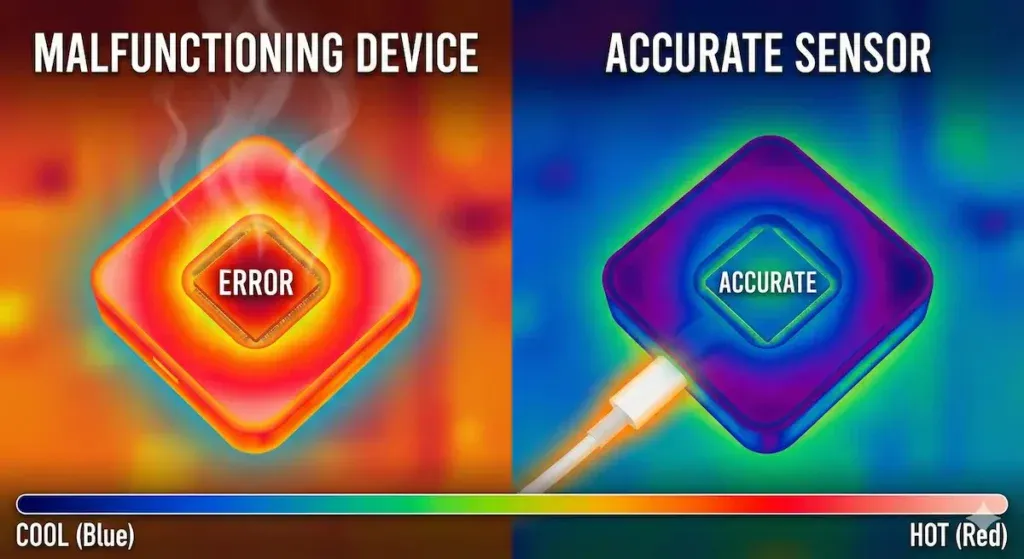
Thermal simulation concept. Internal sensors suffer from device self-heating (Left), whereas the decoupled cable sensor remains accurate (Right).
If SwitchBot had placed a high-precision sensor (like a Sensirion SHT4x) on the main PCB, the sensor would inevitably measure the device’s internal temperature rather than the room’s.
Engineers typically fight this with Software Compensation. They simply subtract a static offset, such as 2.5°C, from the raw sensor data. The problem with this approach is that it assumes a constant load. If the Hub starts working hard—downloading an OTA update or routing heavy traffic—the CPU heats up more, rendering the static offset inaccurate.
The Hardware Solution
SwitchBot’s solution was Physical Isolation. By moving the sensor to the cable, roughly 10-15cm away from the main heat source, they achieved near-perfect measurement of the ambient air.
This likely requires an I2C bus running through the USB cable, shielded against power line noise to maintain signal integrity. While this is an expensive choice that increases the Unit Cost, it demonstrates that SwitchBot prioritized data integrity over profit margins for this specific SKU.
Main PCB Analysis: The Brains and the Beams
Cracking open the white polycarbonate shell reveals a densely packed PCB that balances RF performance with IR coverage.
The Brain
At the heart of the Hub 2 lies the Espressif ESP32-WROOM module (or a similar variant depending on the production batch). Even in 2026, the ESP32 remains the undisputed king of IoT. Its dual-core architecture provides sufficient power to handle the Matter stack and local logic simultaneously, while the integrated RF combines Wi-Fi and Bluetooth/BLE on a single die to reduce the BOM count. Furthermore, the mature ESP-IDF framework provides robust libraries for Matter implementation.
The Omnidirectional IR Array
The “Universal Remote” feature requires the Hub to blast Infrared (IR) signals to control legacy appliances like air conditioners and TVs. The PCB layout here is a textbook example of Radial Symmetry.
Seven high-power IR LEDs are arranged in a circle, facing outwards at 360 degrees. Often, a secondary, larger IR LED sits in the center or faces upwards to bounce signals off the ceiling. This “flower” pattern ensures that the IR light floods the room. Unlike a TV remote that must be pointed directly at the receiver, the Hub 2 uses wall and ceiling reflections to hit the target device regardless of where the Hub is placed.
The Architecture of a “Bridge”
Why do we even need a Hub in 2026? Why don’t the end devices just talk directly to the internet?
The answer comes down to the Power Budget. SwitchBot’s core products, such as Curtain motors and Bot finger-pushers, run on batteries. Wi-Fi is too power-hungry for these devices and would drain their batteries in weeks. Bluetooth Low Energy (BLE), on the other hand, allows them to run for 18-24 months.
The Hub 2 acts as a Protocol Translator. It listens to the low-power BLE signals from devices like the SwitchBot Lock Pro (which we analyzed previously), decodes the state (e.g., “Curtain is 50% open”), and then repackets this data into a Matter-compliant IPv6 packet. Finally, it sends it over Wi-Fi to your Apple Home or Google Home interface. This translation layer is computationally intensive, further justifying the thermal separation we discussed earlier.
Technical Comparison: SwitchBot Hub 2 vs. The Competition
To understand the value proposition, let’s compare it to another popular hub, the Aqara Hub M3.
| Feature | SwitchBot Hub 2 | Aqara Hub M3 |
|---|---|---|
| Main Protocol | Wi-Fi + BLE | Wi-Fi + Zigbee + Thread |
| Thermal Design | Decoupled (Cable Sensor) | Internal PCB Sensor |
| Temp Accuracy | High (Ambient) | Moderate (Compensated) |
| IR Blaster | 360° Array | 360° Array |
| Power Source | USB-C (5V/2A) | PoE or USB-C |
| Key Advantage | Superior environmental data | Edge Computing Power |
While the Aqara M3 is a powerhouse for local automation logic, SwitchBot wins on environmental sensing accuracy. The M3 generates significant heat due to its more powerful processor, and while its internal sensor is good, the physics of the Hub 2’s cable sensor makes it superior for controlling thermostats or AC units based on room temperature.
Pros and Cons: An Engineer’s Verdict
After analyzing the PCB and the enclosure, here is the summary for hardware enthusiasts.
The Engineering Wins
The most significant win is the Thermal Decoupling. The cable sensor is a legitimate innovation that solves a real problem. Additionally, the RF Layout shows good separation between the Wi-Fi/BLE antenna and the power regulation circuitry to minimize noise. The design also succeeds in Aesthetic Utility by combining the display, button, and sensor hub into one unit.
The Trade-offs
The biggest downside is the Proprietary Cabling. If the cable breaks, the device loses its primary sensing capability, and you cannot simply buy a replacement at a convenience store. Repairability is also an issue; the unit is ultrasonic-welded or heavily clipped. Opening it without damaging the plastic casing is difficult, making board-level repair unlikely for the average user.
Conclusion
The SwitchBot Hub 2 is a reminder that sometimes the best solution to a high-tech problem is a low-tech physical change. Instead of writing complex algorithms to filter out CPU heat, they simply moved the sensor.
For embedded engineers, this device teaches a valuable lesson: Don’t let your form factor dictate your performance. If the PCB is too hot, move the sensor. It’s a bold move that paid off, creating one of the most reliable environmental triggers in the Matter ecosystem today.