We usually have to wait for a teardown video to understand a device’s true capabilities. But for hardware engineers, the FCC filing is often more revealing than the official product launch.
I’ve spent some time analyzing the internal photos and RF reports filed under FCC ID: 2AKIT-HMG01, better known as the Aqara Hub M3. While the marketing materials focus on “Matter” and “Flow,” the PCB layout tells a much more interesting story about reliability and edge computing.
Aqara isn’t just updating a gateway; they are seemingly trying to build a local server for your home. Here is a technical breakdown of why this hardware design matters.
1. Why Wired Power is Non-Negotiable
The most significant upgrade visible on the mainboard isn’t a wireless chip—it’s the power delivery system. In the internal photos, located right next to the RJ45 jack, we can clearly see a dedicated Ethernet Isolation Transformer and the associated regulation circuitry.
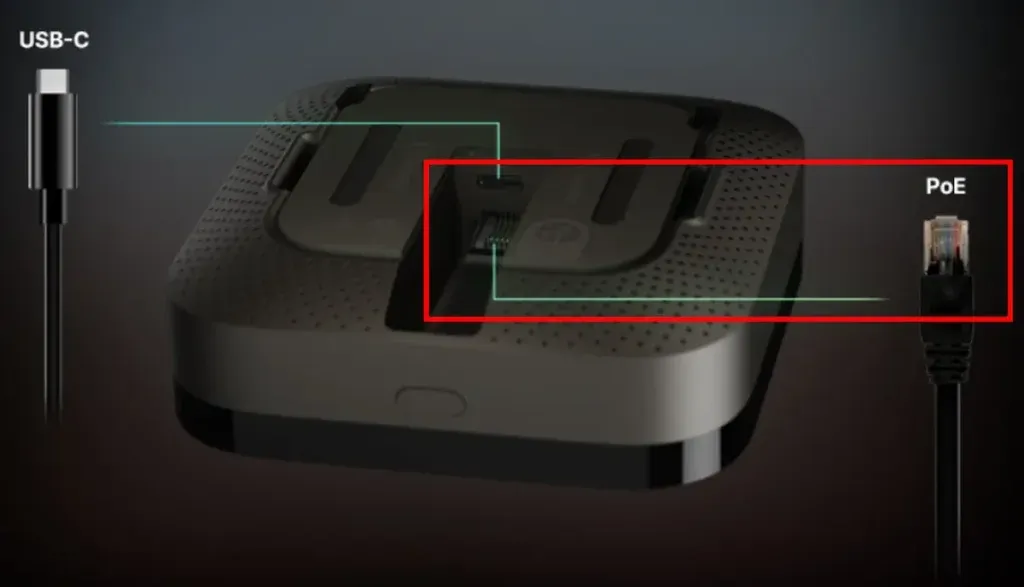
The external RJ45 port isn’t just for data; it supports 802.3af PoE, confirming the presence of an internal isolation transformer for stable power delivery.
Why does this matter?
Most consumer smart home hubs rely on 5V USB power. While convenient, USB power supplies are often noisy, and the cables are prone to voltage drops. By implementing Power over Ethernet (PoE), Aqara is targeting the “Pro-sumer” market.
From an engineering perspective, PoE provides galvanic isolation and a stable power rail that doesn’t fluctuate with household load. It means the M3 can be mounted on a ceiling or in a closet with a single cable carrying both power and gigabit data. This effectively eliminates “Wi-Fi dropouts” as a point of failure. If you are serious about automation, a hardwired brain is non-negotiable.
2. How Aqara Solved the 2.4GHz RF Nightmare
Designing a hub that supports Dual-band Wi-Fi, Thread, Zigbee, and Bluetooth 5.1 is a nightmare for RF engineers. The 2.4GHz spectrum is incredibly crowded, and having three radios (Wi-Fi, Thread, BLE) screaming on the same frequency band usually results in packet loss.
Looking at the antenna placement in the filing, Aqara has taken a brute-force approach to Interference Mitigation:
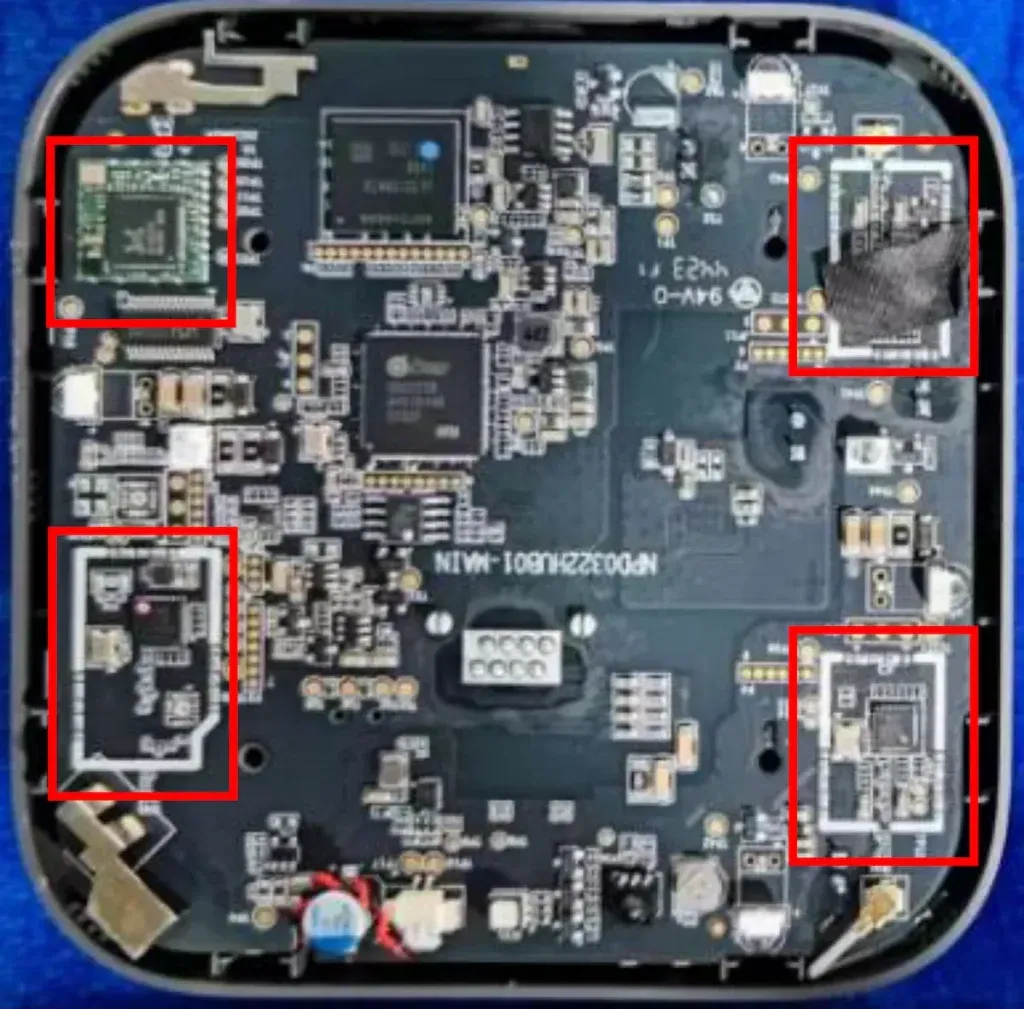
Internal PCB layout revealing the deliberate spatial separation between the Wi-Fi and Thread antennas. This physical isolation is critical for minimizing RF interference in the crowded 2.4GHz spectrum.
-
Spatial Separation: The Zigbee/Thread antenna is physically distanced from the Wi-Fi antennas on the PCB.
-
Shielding: There appears to be significant shielding cans over the RF front-end modules.
This design suggests that the M3 is built to handle the ‘Thread Border Router’ role perfectly, ensuring seamless connection for devices like the [Aqara U200 Smart Lock]. For the end-user, this translates to faster response times for Matter devices, as the hub spends less time dealing with re-transmissions caused by internal interference.
3. Why This Hardware is Critical for Matter
Many users complain that Matter devices are slow or “unresponsive.” Usually, this isn’t a software bug; it’s a hardware bottleneck. Matter requires the controller to be constantly active, routing packets between Thread and Wi-Fi networks.
The upgraded SoC and memory architecture in the M3 suggest it is designed to handle this high-throughput traffic without crashing. Unlike cloud-dependent hubs that stop working when the internet cuts out, the M3’s hardware specs indicate it can fully execute the “Local Home” promise of Matter 1.2 and beyond. It effectively acts as a traffic cop that never sleeps.
4. Comparison: Aqara M2 vs. M3 (Hardware View)
To visualize the leap in engineering, let’s compare the M3 to its predecessor, the M2.
| Feature | Aqara Hub M2 | Aqara Hub M3 (FCC Revealed) |
|---|---|---|
| Power | 5V Micro-USB | PoE (802.3af) + USB-C |
| Storage | Minimal Flash | 8GB eMMC (Est.) |
| Protocol | Zigbee 3.0 / IR | Thread / Matter / Zigbee / BLE |
| Connectivity | Wi-Fi 2.4GHz | Dual-band Wi-Fi (2.4/5GHz) |
| Primary Role | Cloud Gateway | Edge Server / Border Router |
5. The Hardware Proof of Edge Computing
The previous generation (M2) was efficient, but it was ultimately just a bridge. The M3’s mainboard reveals a shift in philosophy. We can spot a substantial eMMC Flash Storage chip and a more powerful SoC (likely a dual-core ARM architecture).
In the world of embedded systems, moving from raw NOR flash to managed eMMC storage is a clear indicator of Local Computing.
This hardware isn’t just shuffling packets to the cloud; it has the I/O throughput and storage capacity to run local databases and complex automation engines offline. This is crucial when handling high-data sensors such as the [Aqara FP2 mmWave Sensor], ensuring instant trigger response.
Final Verdict: A True Smart Home Server
The FCC internal photos confirm that the Aqara Hub M3 is over-engineered in the best possible way. The inclusion of PoE and the careful RF layout indicates that this device is meant to be infrastructure, not just a gadget.
For those of us tired of rebooting our hubs or dealing with cloud latency, the hardware inside the M3 offers a promising solution. Compared to competitors analyzed in my [SwitchBot Hub 3 Review], the Aqara M3 focuses more on infrastructure stability via PoE.
What This Means for Home Assistant Users
While this is an Aqara product, the hardware specs make it an intriguing device for the broader smart home community. If Aqara allows open access (or if the community finds a way to root it), this hardware could be the perfect dedicated Zigbee/Thread coordinator for Home Assistant, replacing fragile USB dongles.