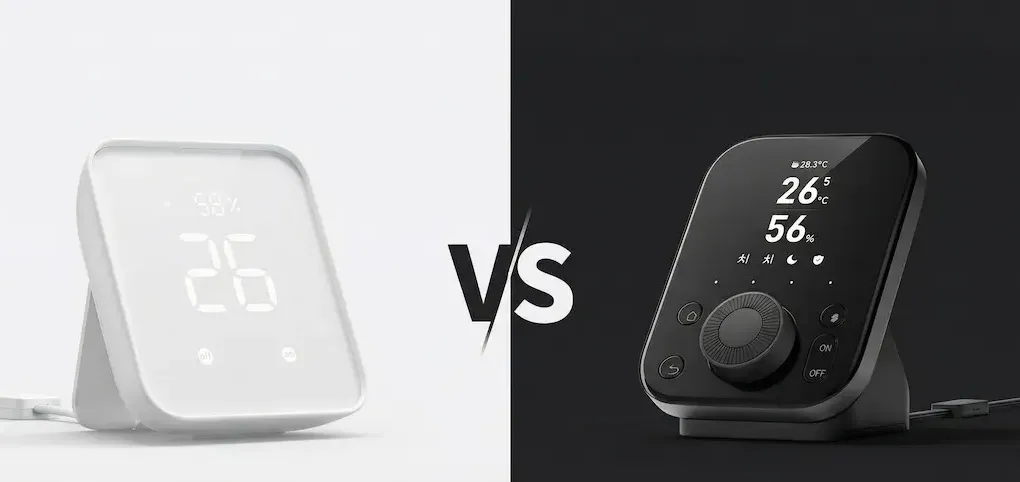
It has been roughly eight months since SwitchBot disrupted the market with the SwitchBot Hub 3 in May 2025. With the recent announcement of the high-end AI Hub at CES 2026, the product lineup has become somewhat crowded.
For many engineers and smart home enthusiasts, the choice between the established Hub 2 and the newer Hub 3 isn’t obvious. On the surface, one has a screen and buttons, while the other has a dial. But as is often the case in embedded systems, the real story lies in the protocol stack and the architectural role each device plays in your network.
In this analysis, I’m stripping away the marketing gloss to compare the silicon, the thermal engineering, and the Matter implementation of these two devices.
The Interface Evolution: From Passive to Active
The most immediate difference isn’t just aesthetic; it’s a fundamental shift in User Experience (UX) engineering.
The Static Utility of Hub 2
When the Hub 2 launched, it was designed to be a “set-and-forget” device. Its 7-segment LED display is functional, showing temperature and humidity clearly, but it is passive. You look at it; you don’t interact with it. The two capacitive touch buttons are useful for triggering a specific scene (like “Good Morning”), but they lack granularity. It is, effectively, a sensor cluster that you mount on a wall and ignore.
The Tactile Control of Hub 3
The Hub 3 introduces the “Dial Master™”, a rotary knob interface that changes the device’s relationship with the user. From an engineering perspective, this moves the device from a sensor node to a human-machine interface (HMI).
The rotary input allows for analog-style control over digital parameters—dimming lights via Matter, adjusting thermostat setpoints, or scrolling through device lists. It’s designed to sit on a desk or nightstand, reducing the “friction” of needing to pull out a smartphone just to adjust the brightness of a room.
While this post focuses on the comparison, you can see the specific chipsets and PCB layout driving this new interface in my dedicated [SwitchBot Hub 3 Hardware Design review].
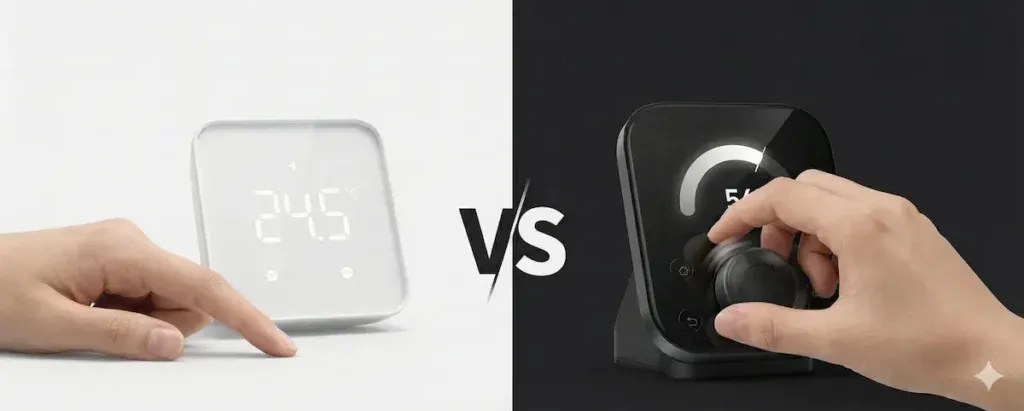
The UX Shift: Moving from the passive data monitoring of Hub 2 (Left) to the active tactile command of the Hub 3 Dial Master™ (Right).
Protocol Architecture: Bridge vs. Controller
This is the most critical distinction for system architects. While both devices support Matter, their roles within the ecosystem are distinct as defined by the Connectivity Standards Alliance (CSA).
Hub 2: The Translation Layer
The SwitchBot Hub 2 operates primarily as a Matter Bridge. Its internal MCU listens for Bluetooth Low Energy (BLE) packets from SwitchBot’s sub-devices (Curtains, Bots, Blind Tilts) and wraps them in IPv6 headers to broadcast them onto the Matter network.
It is a translator. It takes a proprietary language (SwitchBot BLE) and speaks a standard language (Matter). However, it cannot control other Matter devices. It is an endpoint uploader, not a network commander.
Hub 3: The Central Coordinator
The Hub 3 utilizes a more robust SoC (System on Chip) that allows it to function as a legitimate Matter Controller.
Unlike its predecessor, the Hub 3 can issue commands to third-party devices. This means you can map the Hub 3’s rotary dial to control a Philips Hue bulb or an Eve Motion Blind directly. It acts as a local orchestrator, reducing the latency overhead by processing interaction logic locally rather than relying entirely on cloud routines or external hubs (like an Apple TV) for simple tasks. Benchmarks suggest the Hub 3 can handle a larger routing table, supporting stability for over 30 sub-devices, whereas the Hub 2 often hits a bottleneck with complex bridging setups.
Thermal Engineering and Sensor Placement
One of my favorite engineering quirks of the Hub 2 was its solution to heat management.
Wi-Fi chips generate heat. If you place a temperature sensor next to a Wi-Fi radio, your data gets corrupted by “self-heating.” The Hub 2 solved this by physically removing the sensor from the PCB and embedding it into the USB-C power cable. It was a crude, low-tech, but scientifically perfect solution.
I explained exactly why this design is brilliant in my detailed [SwitchBot Hub 2 Teardown analysis].
The Hub 3, however, returns to an integrated form factor. With a display screen and a powerful processor, the thermal noise floor is higher. While SwitchBot engineers implemented active thermal compensation algorithms, there is a slight “settling time” when the device boots up. For absolute data purists who need lab-grade temperature logging, the Hub 2’s “cable sensor” remains the superior design choice.
The 2026 Landscape: What About the AI Hub?
If you’ve been following the news from CES 2026, you know that SwitchBot just teased the high-end AI Hub with local vision processing.
This makes the decision matrix clearer:
-
SwitchBot AI Hub: For users who need a “Super Brain” to analyze camera feeds (NVR functionality).
-
SwitchBot Hub 3: For users who need a “Tactile Commander” on their desk.
-
SwitchBot Hub 2: For users who need a hidden bridge behind the TV.
The Engineer’s Takeaway
Stick with the Hub 2 if: You need a reliable bridge to get your SwitchBot Curtains into HomeKit or Home Assistant, and you plan to hide the hub behind a TV or cabinet. The lack of a rotary dial doesn’t matter if the device is invisible.
Upgrade to the Hub 3 if: You want a physical controller on your desk. The ability to dim lights or adjust volume with a physical knob offers a tactile satisfaction that voice assistants cannot match. Furthermore, if you are building a mixed-brand smart home, the Hub 3’s ability to control third-party Matter devices makes it a central piece of infrastructure rather than just an accessory.
Especially if you plan to integrate robust security devices like the [SwitchBot Lock Pro], having a stable Matter Controller is non-negotiable.
Note: This analysis is based on hardware specifications and firmware capabilities available as of January 2026.